Ticketing and helpdesk software built for real workflows
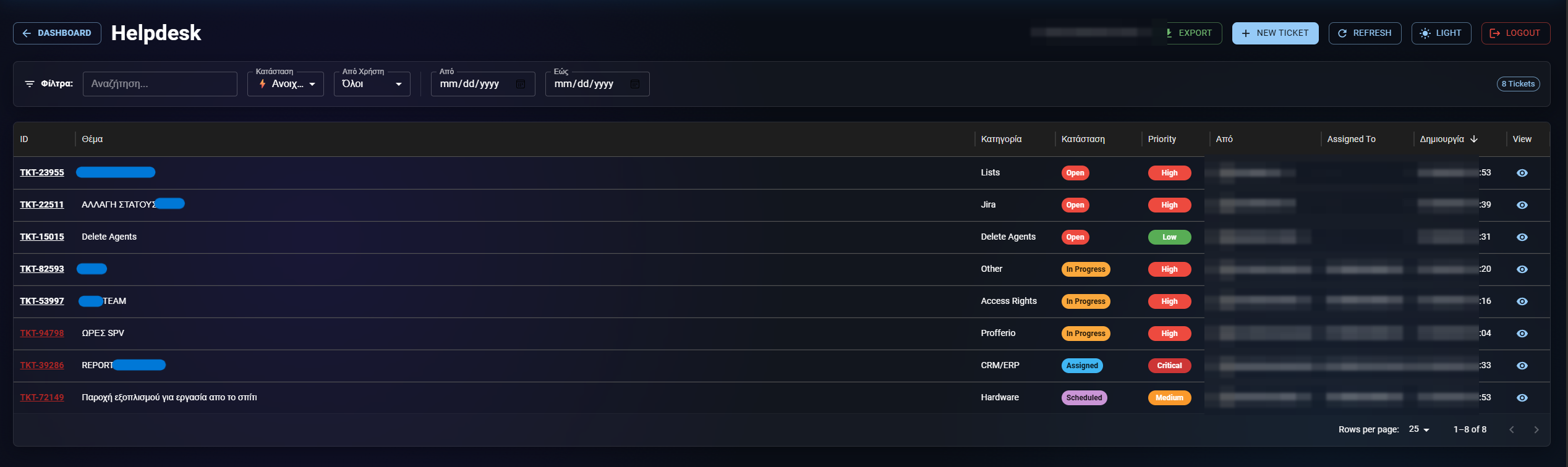
Profferio Service Management is ticketing and helpdesk software: requests arrive from a form, an email or a portal, follow the workflow you design without code, with SLAs, automated actions and a full change history on every ticket.
- Projects with their own forms, workflows, statuses and permissions
- No-code workflows: statuses, transitions, conditions, validators
- SLAs with timers, priorities and escalation
- Dynamic forms with sections and conditional fields
- Automations: notifications, emails, Viber messages, archiving
- Customer portal and reports with your own pivot tables
What the service desk includes
Requests from anywhere
Form, email or customer portal. Every ticket gets an owner, a priority, an SLA and a history that cannot be erased.
No-code workflows
Design statuses and transitions with conditions and validators. Each team works its own way inside one system.
Dynamic forms
Fields with sections, requirements and conditional display. A shared field library keeps names consistent across projects.
Automations
Rules that run themselves: notifications, status changes, emails, Viber messages to customers, automatic closure.
Reports and pivots
Your own tables per project, with dimensions, value groups and saved templates. Excel export with correct timestamps.
Customer portal
Customers submit and track requests in a clean space without seeing your internals.
How it goes live
-
1. Projects and teams
Define which departments take requests and who sees what. Scope follows the projects each person belongs to.
-
2. Forms and workflows
Build the form and workflow for each request type by drag and drop.
-
3. Rules and SLAs
Response times, escalations, automated actions and notifications.
-
4. Measurement
Targets per person and team, live reports, full transition history.
What years of service desks teach you
The workflow is the product
Two teams rarely work the same way. A system that forces one workflow on everyone ends up bypassed by email. That is why each project defines its own statuses, conditions and validators, with no development required.
Data isolation is not a detail
Who sees which ticket follows the projects a user belongs to — and the rule holds in reports, not just in lists. A report leaking another department's data is the same problem as a screen showing it.
History is the argument
When something goes wrong the question is always who changed it and when. Every status transition keeps its actor and timestamp, and reports can answer that without digging through logs.
Ticketing FAQ
Can it replace Jira Service Management?
Yes. It covers projects, workflows with conditions and validators, SLAs, automations, forms, a customer portal and reports, at a substantially lower cost. There is a detailed comparison on the Profferio vs Jira page.
Can I build my own workflows without a developer?
Yes. Statuses, transitions, conditions and validators are defined from the GUI, per project.
Does it accept requests by email?
Yes, as well as from public forms and the customer portal.
Does it support SLAs and escalation?
Yes. You set response and resolution times per priority, with automatic notifications and escalation as deadlines approach.
How are customers kept informed?
By email, through the portal, or with automated Viber messages triggered by ticket rules.
Are there per-person performance reports?
Yes, with targets per person and per-worked-hour calculations, because time tracking lives in the same platform.
Last updated:
See also
Digital Work Card: time tracking with a direct ERGANI II connection
Shifts, hours & leaveShift scheduling, working hours and leave in one system
Business Viber AutomationAutomated Viber messages to customers, straight from your tickets
Contact centre (PCC)Contact centre software with a dialer, queues and live reports
Profferio vs JiraThe Greek Jira alternative